Please note that the Live Corners feature demonstrated is only available in Illustrator CC or newer.
Below is Part 1, in case you missed it:

Please note that the Live Corners feature demonstrated is only available in Illustrator CC or newer.
Below is Part 1, in case you missed it:
Time saving t-shirt design textures, mockups, graphics, logo templates, fonts, and tutorials for Adobe, CorelDraw, and Affinity.
Learn about:
How to find and choose good photo reference
Rough sketching in the Procreate App for iPad
How to exaggerate and stylize your design
How to turn a thumbnail sketch into a clean vector logo in Adobe Illustrator.
Learn about:
A new way to use the Delete Anchor Point Tool
The importance of line weights
Why and how to use a low number of vector points
Pro’s and cons of the Width Tool
Why and how to round corners
How to make smooth curves
Using the Pen Tool
Using the Scissors Tool
Free Rodeo Brushes are in Graphic Design Launch Kit
Illustrator Flex Frames are in T-Shirt Design Master Collection 2
Especially good for making realistic mockups, the Liquify Persona will allow you to bend your graphic to match the shape of fabric ripples.
How to use the Liquify Filter in Photoshop to make your t-shirt & apparel mockups look more realistic.
[Tutorial] How to extract the colors from a flattened image into separate layers.
When you flip out a dark to light color scheme, sometimes the image will have an "x-ray" look. This tutorial shows how to correct the problem.
How to download the files, install fonts, and edit the designs in Affinity Designer for iPad. This tutorial covers all Affinity graphic and logo templates bundles from TheVectorLab.
[Photoshop Tutorial] Use your Phone Snapshots to make T-Shirt Graphics - Inspired by The Endless Summer Movie from 1966
Make your t-shirt graphics look screen printed on fabric with T-Shirt Mockup Panels for CorelDraw.
This tutorial demonstrates how to use the Men's T-Shirt Mockup Templates for CorelDraw. This same method applies to all other men's and women's apparel mockup templates for CorelDraw.
[Tutorial for Adobe Illustrator] Using the Image Trace function.
Also mentioned in video: the "Opacity Mask Method” will allow you to knock transparency through your designs in Illustrator, using either bitmap or vector textures.
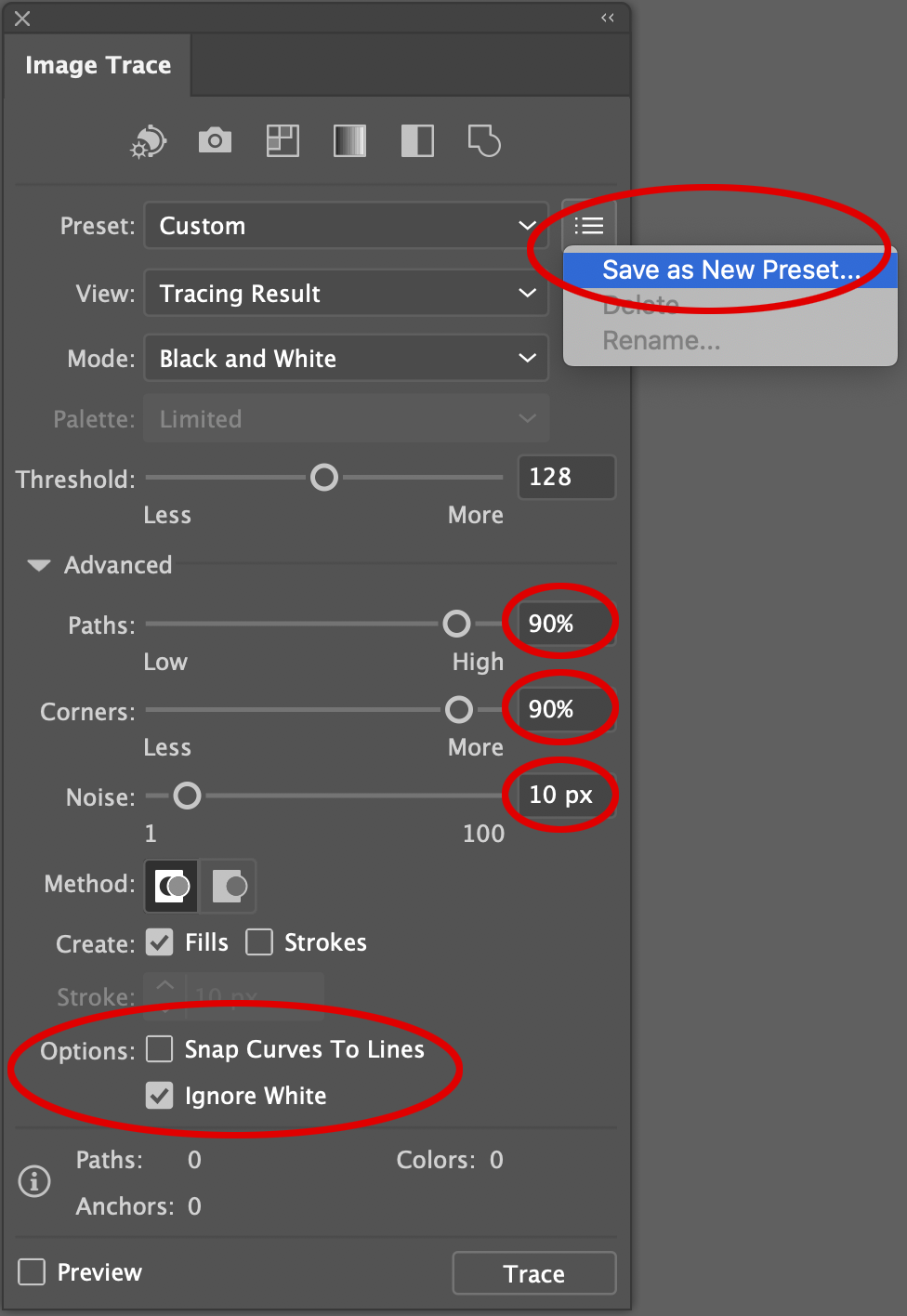
Image Trace Settings
You can Save as a New Preset if you plan to convert more than on image.
Apply spray paint textures to your designs in Photoshop.
Making diffusion dither bitmaps in Photoshop and Illustrator. If you want to make the dither effect more obvious (pixelated on purpose… it’s a look!) you can keep your pixels per inch @ 80 or lower.
The textures mentioned are in T-Shirt Design Master Collection 2
Picking the perfect in-between colors with the blend tool.